10 min read
Bullhorn batch ingestion Part 1: 3-legged OAuth and rotating refresh tokens
Hi! This is the first post in a multi-part series I’m writing. The system I built is a scheduled batch ingestion pipeline that pulls data from Bullhorn and writes it to a data lake. Downstream, those tables serve internal dashboards and analytics workloads.
Bullhorn is a CRM for staffing and recruiting companies. Think Salesforce, but purpose-built around the recruiting workflow (candidates, jobs, submissions, placements, prescreen notes).
This post is about Bullhorn’s OAuth 2.0 and REST session flow, and the edge cases it brings to a backend batch sync.
Part 2 will cover the incremental sync logic itself and the associated nuances of working with both JPQL-based queries and Lucene-backed indexing.
And Part 3 covers pipeline engineering: storage decisions + tradeoffs, downstream use cases, and how I designed the sync for its consumers.
Bullhorn’s REST API reference is here if you want to follow along.
3-legged vs. 2-legged OAuth: why it matters for a batch pipeline
The first interesting design constraint when building a Bullhorn batch pipeline is that Bullhorn’s API uses 3-legged OAuth.
In 3-legged OAuth, an application accesses data under a user’s authorization rather than authenticating only as itself.
It’s the type of pattern you see when an app acts on behalf of a user. For example, signing in with Google on an external site, where Google shows an explicit consent screen before granting the external app permission.
The user is involved in establishing that authorization, but does not necessarily need to be present every time the application runs.
Bullhorn API access is tied to a Bullhorn user and that user’s permissions, so anchoring each API session to a specific identity is a logical default.
In a simplified three-party view, the three “legs” are:
- The user, whose authorization and permissions the application relies on
- The client app, which is the thing you’re building
- The service (Bullhorn) that authenticates the user, issues credentials, and exposes the API
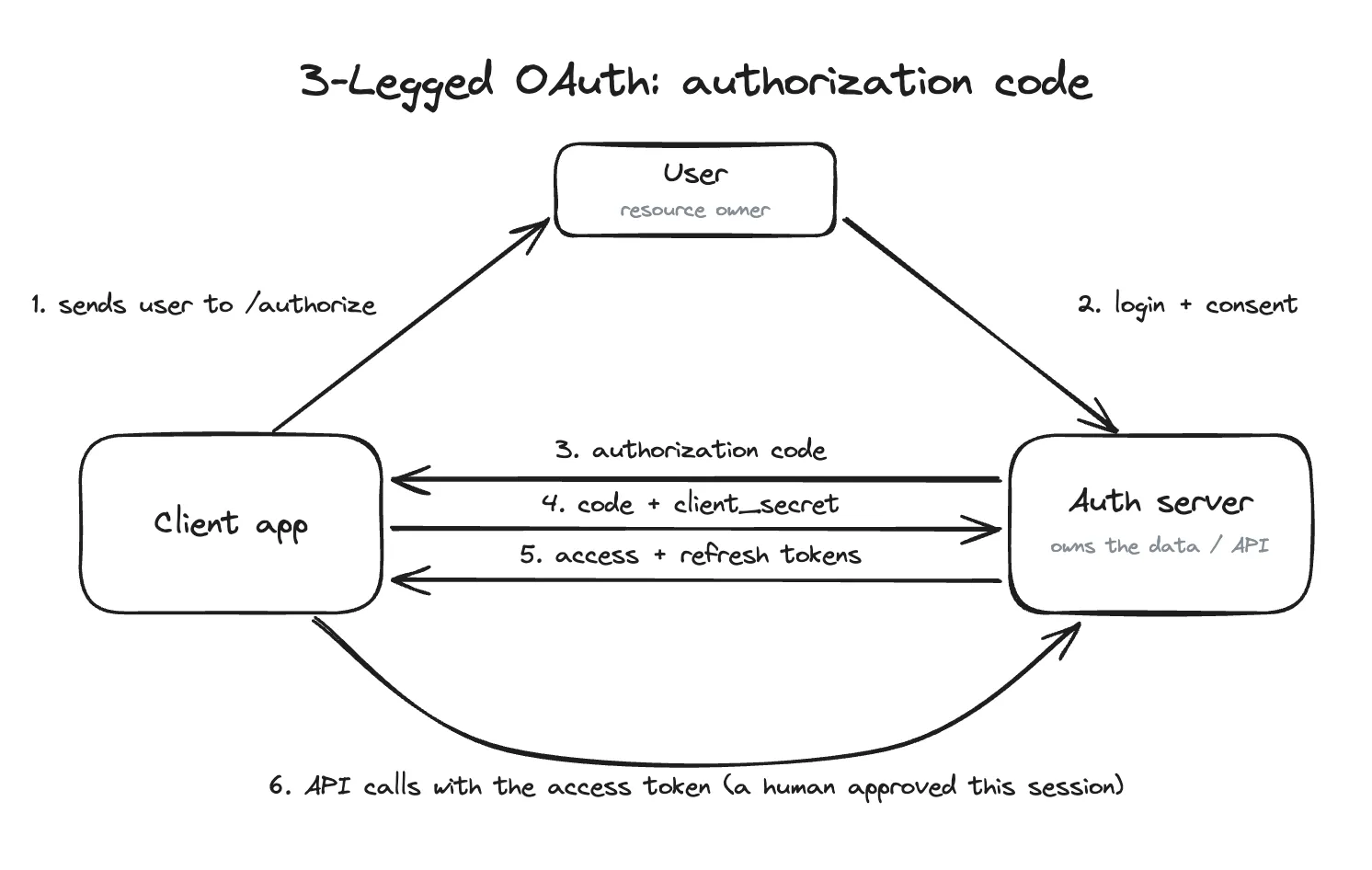
3-legged OAuth: a user authorizes the client before the first tokens are issued. Refresh tokens can then allow the backend to continue without repeating that step on every run.
In contrast, a 2-legged or client-credentials flow has no separate user authorization step.
The client app presents its own credentials (client ID and secret) to get an access token, then uses that token to call the API.
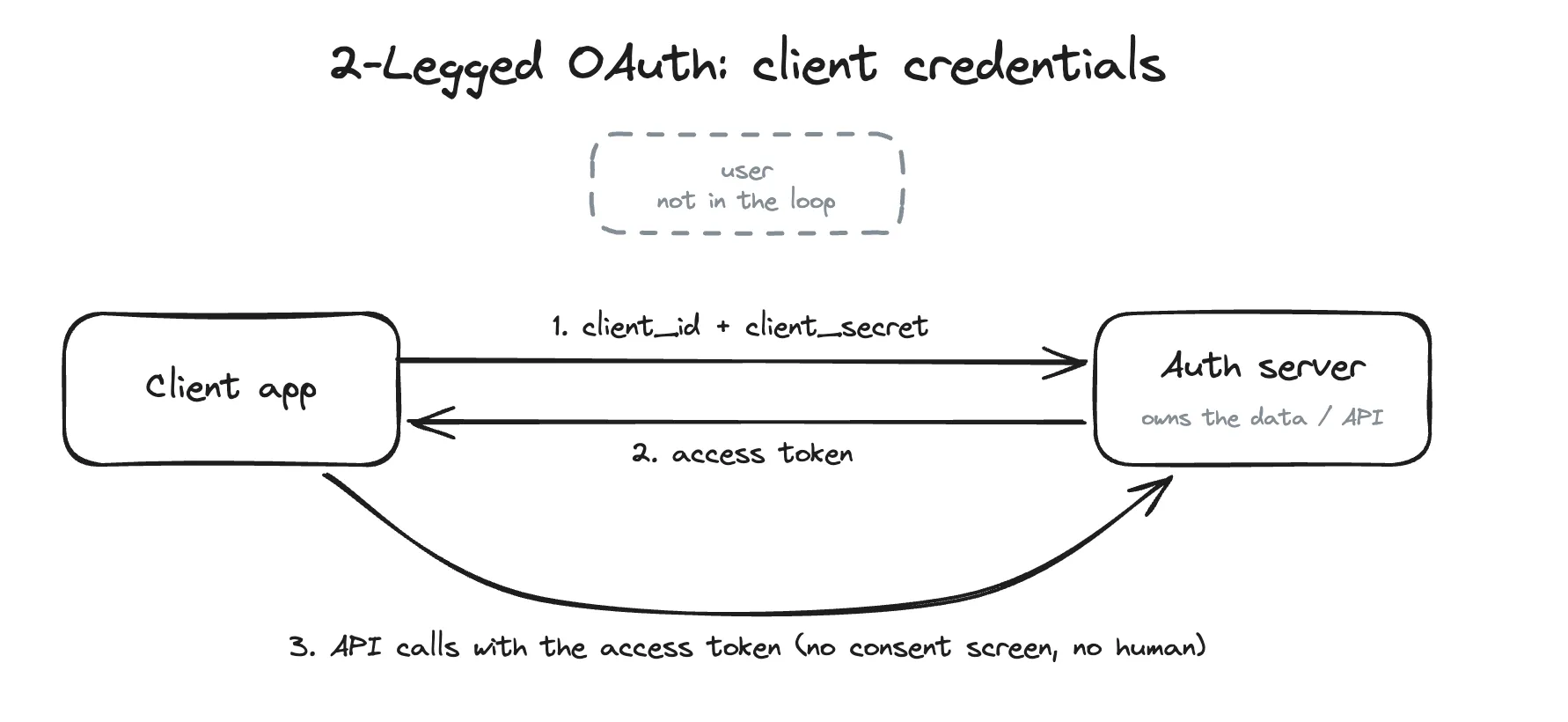
2-legged OAuth: the client authenticates as itself. No user, no consent screen (typical 2LO flow).
A client-credentials flow is often a simpler fit for a server-to-server job because the application authenticates as itself and does not have to maintain a user-authorized token chain.
Many CRMs are built around 3LO, but some (Salesforce for example) also offer the OAuth 2.0 client credentials flow for backend integrations.
Bullhorn’s public REST documentation, however, does not describe a client-credentials flow. Its documented process begins with a Bullhorn user login and an authorization code.
Without a client-credentials grant, the thing that keeps the integration alive between runs is a single-use refresh token. And storing, rotating, and recovering that token becomes the pipeline’s problem.
Bullhorn’s auth flow and the refresh token problem
Before we discuss some of these complexities, it’s important to understand what Bullhorn’s specific auth flow looks like:
- Look up your data center URLs: Send a
GETrequest to/rest-services/loginInfowith yourusername. - Get an authorization code: Send a
GETrequest to/oauth/authorizewithclient_id,response_type=code,username,password, andaction=Login. The code returns as a query parameter on the redirect URL. - Exchange the code for tokens: Send a
POSTrequest to/oauth/tokenwithgrant_type=authorization_code, the code from step 2, yourclient_id, andclient_secret. This returns a short-lived access token (10 minutes) and a long-lived refresh token. - Exchange the access token for a session: Send a
POSTrequest to/rest-services/login?version=*&access_token=...using the access token. You receive aBhRestTokensession token and the baserestUrlfor your actual API requests. - Call the API: Include the
BhRestTokenin your headers and target therestUrlfor all subsequent requests. - Handle session expiration: When the REST session expires, use the latest
refresh_tokento retrieve a new access token and establish a new REST session. If that refresh token can no longer be used, re-run the authorization flow starting from step 2.
Note that this flow differs slightly from the standard 3LO pattern shown above because Bullhorn’s OAuth access token is not used directly on normal data requests. It is exchanged once at /login for a BhRestToken, and that REST session token accompanies the subsequent API calls.
The interesting architectural question arises in step 6: what do we do when the session expires?
Bullhorn’s documentation recommends checking the session expiration rather than assuming a fixed lifetime. It also warns:
There are two renewal paths:
- Re-run the full auth flow (avoid the refresh token). When your session expires, you pass
username,password, andaction=Loginto/authorizeand start the auth process over. This is simple and you can keep service-account credentials stored as a secret in a managed secrets store. The tradeoff, however, is that Bullhorn throttles login rates. And depending on the frequency of your sync, you could get blocked. - Use the refresh token. This dodges the login throttling, but Bullhorn’s refresh tokens are single-use: “a refresh token expires after it is used once”, so the old token is dead the instant the new one is issued. That creates a gap between receiving the new token and persisting it. If a network error eats the response, or the write to storage fails, the new token is lost and the old one is already retired. The next run would load a dead token, and the sync is stuck.
That leaves two separate design problems: only one run should attempt a rotation at a time, and a delayed run should not be able to overwrite newer authentication state. A scheduler setting may prevent ordinary overlap, but it might not cover manual backfills, retries, or a second worker starting elsewhere.
Coordinating refresh-token rotation with a database lease
The solution needs to handle two related problems: preventing two runs from rotating the token at the same time, and recovering if a rotation fails after Bullhorn has already retired the old token.
Keep the authentication state in one shared record
One practical approach is to store the current authentication state in a single shared database record. You could use any database that supports conditional updates, e.g. DynamoDB or Postgres.
The record contains the latest refresh token, the current REST session, its expiration time, and a version number. It also tracks whether another run currently holds a lease.
Architecturally, that record needs to answer four questions:
- What is the current refresh token?
- Is the existing REST session still usable?
- Is another run already refreshing it?
- Has the authentication state changed since this run read it?
Guard 1: claim the rotation with a short lease
Before calling Bullhorn’s refresh endpoint, a run first tries to acquire a lease on the shared record.
A lease is a temporary claim to the work. While it is active, other runs know that one process is already responsible for rotating the token. The database grants the lease only if no unexpired lease exists and the authentication state has not changed since the run last read it.
If the lease request fails, the run does not call Bullhorn. Instead, it re-reads the shared record. Another process may still be refreshing the token, or it may have already completed the rotation.
The expiration is what makes this a lease rather than a permanent lock. If the process crashes, it does not block the system forever. Once the lease expires, another run can take over.
Guard 2: confirm ownership before saving
The short lease isn’t enough on its own. A process could pause for longer than expected, allow its lease to expire, and then resume after another process has taken over.
Martin Kleppmann describes this failure mode in his article on distributed locks and leases.
To protect against it, each lease is given its own generation number. The authentication state also has a version number that increases each time the token or session is updated.
After Bullhorn returns a new token, the run can save it only if:
- The authentication version is still the one it originally read.
- The run still owns the current lease generation.
If both checks pass, the new refresh token and REST session are saved, the authentication version increases, and the lease is cleared. This is a form of conditional write (often called compare-and-swap).
If either check fails, the database rejects the write. The delayed process re-reads the shared record rather than overwriting newer authentication state.
Recovery: fallback on invalid_grant
If the process crashes or loses the response after Bullhorn rotates the token, the database may still contain the retired token. The next run will try to use it and may receive an invalid_grant response.
When that happens, the run first re-reads the shared record.
If the version has advanced, another process may already have completed the rotation, so the run uses the newer token and session.
If the same unusable token is still present, the run acquires a new lease and falls back to the full /authorize flow using stored credentials. The recovered authentication state is then written back to the shared record.
The recovery path uses the same lease because reauthorization is also shared work. Without it, several workers could encounter the same error and all attempt to log in at once. One run should perform the recovery while the others wait for the shared record to be updated.
An operational alert should also be raised when this happens, since it means the normal refresh-token path did not complete successfully.
The full lifecycle of this approach is:
- Read the shared authentication state.
- Reuse the current REST session if it is still valid.
- If it needs to be renewed, acquire a short database lease.
- Refresh the token and conditionally save the result.
- If the token has already been invalidated, re-read the state before beginning one guarded reauthorization.
Takeaways
Bullhorn’s user-authorized OAuth flow can support a server-to-server sync, but the integration must manage the authentication state between runs.
To account for this you could implement a shared database record to monitor the current state. In this approach, a lease coordinates which process is responsible for refreshing it, version checks prevent a delayed process from overwriting newer state, and a guarded reauthorization path allows the system to recover when a token rotation fails halfway through.
Thanks for reading! In Part 2, I’ll dig deeper into several of Bullhorn’s API query engines and their interesting quirks, where JPQL-based queries and Lucene-backed indexing disagree, and what that means for ordering and pagination.